
Contact us
The MiniTec web shop is growing in popularity. As a key new feature for larger companies and organizations, users can now save any number of delivery and billing addresses.
More and more customers are using the MiniTec web shop for their orders and inquiries. Last year, there were well over 1,000 new registrations, and the trend continues to rise. Many of these are larger companies with multiple locations. These companies increasingly expressed a desire to be able to create different shipping and billing addresses.
This option is now available: Once the user has completed their shopping cart, the addresses for delivery and billing are now displayed in the “Payment and Delivery” information window. By default, the information is taken from the user’s account. If the order is to be sent to a different address, simply click on “Change Delivery Address,” enter the new address, and select it. The same procedure applies to different billing addresses. Of course, the new addresses are saved and will be available for future orders. The newly created addresses can also be edited at any time should anything change. And, of course, this works the same way for inquiries.
Why not give it a try right now!
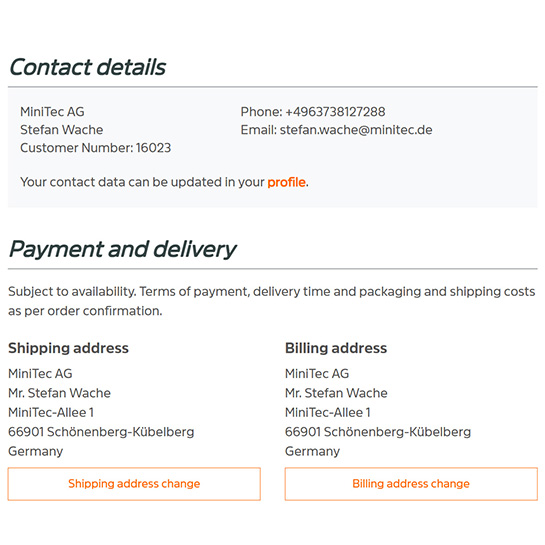
The shipping and billing addresses are displayed during checkout.
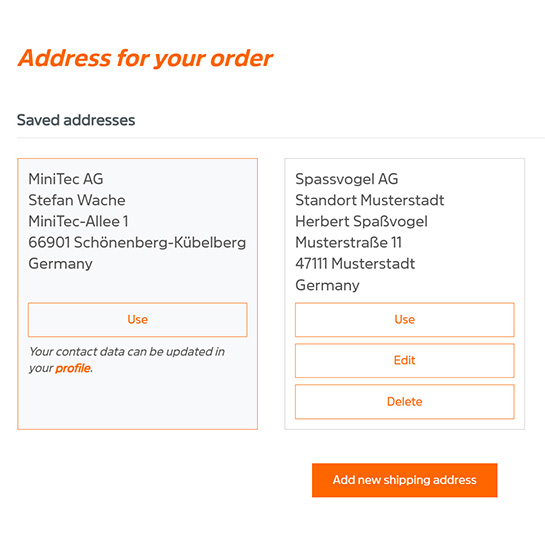
New addresses can be added at any time and can also be edited.